Calling Web APIs with QSWinInet
The JSONPlaceholder API Explorer is a QuadooScript Application that sends HTTPS requests through QSWinInet.dll. It loads posts into a report-style ListView, copies the selected post into an editor, sends JSON request bodies, and displays the response body, headers, HTTP status, and transport result. A nonvisual QuadooPlugin supplies the native networking object.
Download the complete API Explorer project — sources, designer Form definition, QSWinInet dependency, console integration checks, and a ready-to-run Win32 build with its matching runtime DLLs.
Built and verified with the local Win32 release Studio/runtime on November 1, 2026. Website documentation uses static HTML and CSS; requests are made by the downloaded Windows application.
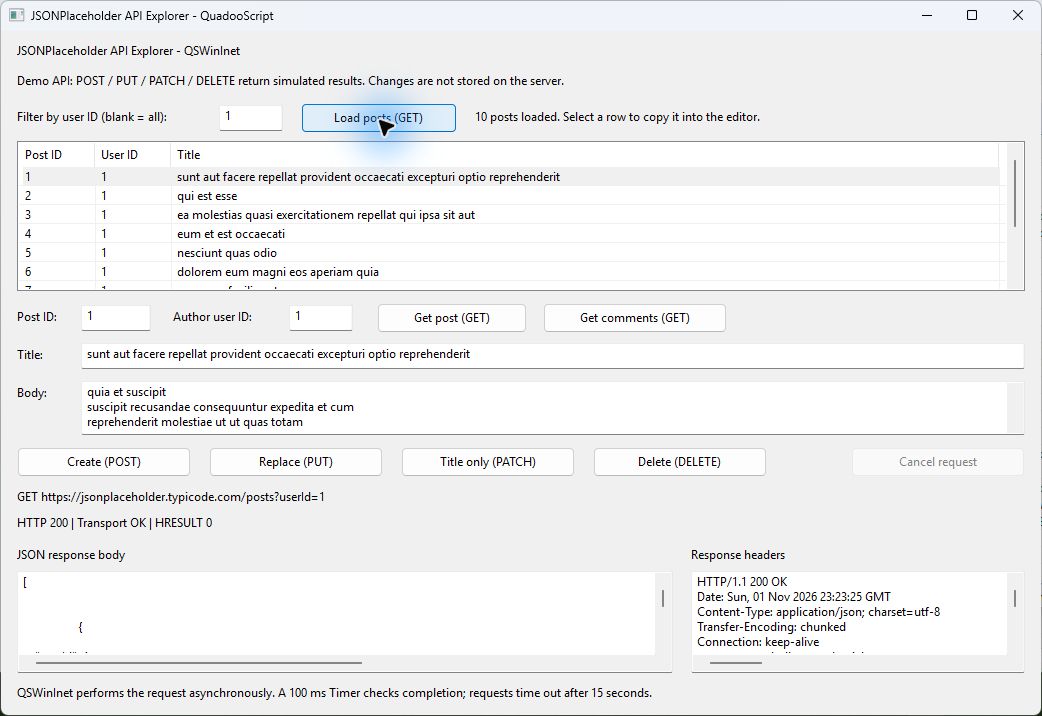
/posts?userId=1. The first post is selected and copied into the editor. The lower panes show the actual JSON and HTTP headers. Click a screenshot to view it at full size.Contents
- Open, build, and try the example
- Form and QuadooPlugin setup
- The plug-in, session, and request objects
- Starting GET and JSON write requests
- Request options and wrapper flags
- Completion, cancellation, and cleanup
- Reading responses and handling errors
- Connecting the response to the ListView
- Project files and distribution
- Implemented behavior and example limits
- Verification and source references
Open, Build, and Try the Example
Extract the ZIP to a writable project folder. Open WinInetExample.qsproj through File > Open Project... in Win32 Quadoo Studio, then use Project > Start Without Debugging (Ctrl+F5). Studio builds bin\Win32\WinInetExample.exe and copies the required runtime and declared module dependency beside it. You can also run the included build directly from that folder.
The current user's Windows WinINet connection, proxy, certificate, and TLS configuration must allow access to JSONPlaceholder. The service requires no API key. Its write endpoints return simulated results and do not persist changes. The service's official guide explains these responses.
- Leave Filter by user ID at
1and click Load posts (GET). Ten posts appear. Clear the filter to retrieve all posts, or enter another numeric user ID. - Select a ListView row. Its ID, author user ID, title, and body fill the editor. Get post (GET) fetches the editor's Post ID again; Get comments (GET) displays its comments in the JSON viewer.
- Enter fictional title/body text and an author user ID from
1to10. Create (POST) sends a new post; its returned ID normally is101. The Post ID field is ignored for this operation. - Use an existing Post ID, such as
1, for Replace (PUT), Title only (PATCH), and Delete (DELETE). Inspect the returned JSON. The ListView keeps its last GET results after a write; fetch the post again to see the original data. - Enter
999999as Post ID and click Get post (GET) to examine HTTP 404 handling. Invalid numeric input is rejected before any request is sent. - While a request is pending, Cancel request is enabled and conflicting controls are disabled. A completion Timer keeps the Form responsive.
| Operation | Method and resource | JSON body |
|---|---|---|
| Load posts | GET /posts or GET /posts?userId=1 | None |
| Get post / comments | GET /posts/1 / GET /posts/1/comments | None |
| Create | POST /posts | userId, title, body |
| Replace | PUT /posts/1 | id, userId, title, body |
| Patch title | PATCH /posts/1 | title only |
| Delete | DELETE /posts/1 | None; a successful demonstration returns {} |
Form and QuadooPlugin Setup
The project is an Application target with ApiForm as its main Form. Use the Application Development Guide for the general new-project and designer workflow. The example already contains the following controls and event connections:
| Component or control | Purpose / settings |
|---|---|
WebPlugin (QuadooPlugin) | Nonvisual component; set its Module property to QSWinInet.dll. |
RequestTimer (Timer) | Nonvisual component; Interval = 100 milliseconds, Enabled = false. Connect OnTimer to RequestTimer_Tick. |
Posts (ListView) | ViewStyle = Report, OwnerData = false, FullRowSelect = true, MultiSelect = false. Columns: Post ID, User ID, Title. Connect OnChange to Posts_Change. |
| Filter / post editor | TextBox controls for the filter, Post ID, author User ID, and title; a Memo for the body. |
| Response viewers | Two read-only Memo controls for JSON text and HTTP headers, with horizontal and vertical scroll bars. |
| Buttons and Form events | Each button's OnClick calls its matching handler. Form OnCreate opens a session; Form OnClose cancels and closes any pending request. |
Add .\Modules\QSWinInet.dll as a project module dependency in Project > Settings.... The DLL in the ZIP is the Win32 release build. The Module property names what to instantiate; the project's module dependency tells the build to copy that DLL beside the executable. Both settings are needed for the packaged example.
"components": [
    {
        "type": "QuadooPlugin",
        "name": "WebPlugin",
        "properties": { "Module": "QSWinInet.dll" }
    },
    {
        "type": "Timer",
        "name": "RequestTimer",
        "properties": { "Enabled": false, "Interval": 100 },
        "events": { "OnTimer": "RequestTimer_Tick" }
    }
]
This excerpt shows the relevant settings; the actual Form file also contains component identities, layout, and other controls. Studio maintains the named property var WebPlugin; and property var RequestTimer; declarations in its managed member region. Keep the generated GUIDs, root properties, and event declarations when editing code.
At runtime, the QuadooPlugin member receives the native object created from QSWinInet.dll. The script calls that member directly. It does not construct CQSWinInet or call a method on a visual placeholder. The application host loads the module through the plug-in's exported factory; this deployment does not require registering the DLL as a COM server.
The Plug-in, Session, and Request Objects
PlaceholderClient receives the live WebPlugin object in its constructor and opens one reusable session:
Client = new PlaceholderClient(WebPlugin);

// Inside PlaceholderClient:
Session = oWinInet.Open("QuadooScript-WinInetExample/1.0", 0, null, null);
The four Open(agent, access, proxy, bypass) arguments are required. The user-agent is a string. Access 0 selects INTERNET_OPEN_TYPE_PRECONFIG; the two null arguments leave explicit proxy and bypass strings unset. Open returns a session, not a response.
The QuadooScript fetch intrinsic accepts the session as its first argument, followed by a full URL and JSON options. It starts a native asynchronous request and returns a request object. It is a QuadooScript intrinsic backed by IQuadooFetch; it does not return a JavaScript Promise.
var options = JSONCreateObject();
options.method = "GET";
options.accept = "application/json";
options.flags = 0x0800 | 0x2000 | 0x1000 | 0x0010;

var request = fetch(Session,
    "https://jsonplaceholder.typicode.com/posts/1", options);
For a one-off call, fetch(WebPlugin, url, options) is also implemented. In that form the options must include an agent string, because the plug-in creates a new session. The example uses an explicitly opened session to reuse it between calls.
The lower-level server interface is available too. It separates the host/port from the resource path. The following is an equivalent way to start a single GET:
var server = Session.Connect("jsonplaceholder.typicode.com", 443,
    null, null, 3);
var options = JSONCreateObject();
options.method = "GET";
options.resource = "/posts/1";
options.accept = "application/json";
// Secure is explicit here: OpenRequest receives a path, not an HTTPS URL.
options.flags = 0x0001 | 0x0800 | 0x2000 | 0x1000 | 0x0010;
var request = server.OpenRequest(options);
Connect(host, port, user, password, service) takes five arguments; 3 is the WinINet HTTP service value. The example uses null credentials. This server object also implements the positional OpenRequest and verb forms, but JSON options keep the request parameters readable.
Starting GET and JSON Write Requests
ApiClient.quadoo defines Start(method, resource, body), which builds the options and returns the native request. Null body is used for GET and DELETE. For writes, create a JSON object instead of concatenating JSON strings:
var body = JSONCreateObject();
body.userId = 1;
body.title = "A QuadooScript API example";
body.body = "Hello from QuadooScript and QSWinInet.";

var request = Client.Start("POST", "/posts", body);
The client's native request setup is:
var options = JSONCreateObject();
options.method = method;
options.accept = "application/json";
options.flags = 0x0800 | 0x2000 | 0x1000 | 0x0010;
options.headers = JSONCreateObject();
options.headers.Accept = "application/json";
if(body != null)
{
    options.headers.Add("Content-Type", "application/json; charset=UTF-8");
    options.body = body;
}
return fetch(Session,
    "https://jsonplaceholder.typicode.com" + resource, options);
QSWinInet serializes the JSON body and encodes it as UTF-8. Quotation marks, backslashes, newlines, and non-ASCII characters are handled by JSON serialization. PUT includes the post's id plus its other fields; PATCH creates a fresh JSON object containing only title.
The sample restricts URL inputs to positive decimal IDs. PostsPath chooses /posts for an empty user filter, otherwise appends a validated integer. PostBody validates an author ID from 1 to 10, a nonblank title up to 200 characters, and a nonblank body up to 5000 characters. For consistency the PATCH button uses this same editor validation before sending only the title.
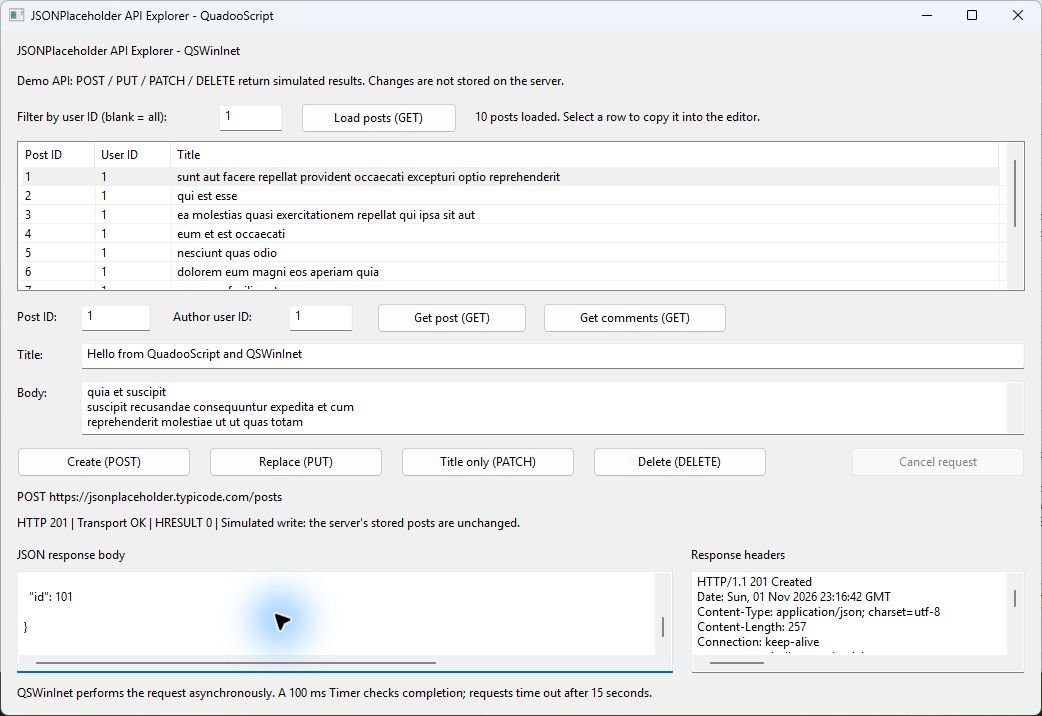
Request Options and Wrapper Flags
These option names are read by the implementation. The sample uses JSON objects for the options and headers.
| Option | Meaning |
|---|---|
method | HTTP verb string; GET if omitted. |
resource | Resource path for server.OpenRequest(options). The URL form of fetch supplies this from the URL. |
accept | Accepted response type as a string, or an array of strings. |
headers | Header string or JSON object whose values are strings. The sample sets Accept and, for JSON writes, Content-Type. |
body | Optional body; the options-object form accepts a string or JSON object. A JSON object is serialized to UTF-8. |
flags | Bitwise combination of the custom WinInetRequest::Flags values below. |
referrer | Optional referrer string; omitted in this example. |
agent, access, proxy, bypass | Session setup options for fetch(WebPlugin, url, options). Agent is required in that form; access defaults to the current user's WinINet configuration. |
| Wrapper flag | Value | Effect in this example |
|---|---|---|
| Secure | 0x0001 | HTTPS. Added by URL-based fetch for https://; explicitly set for the lower-level server call. |
| NoCookies | 0x0010 | Maps to WinINet's no-cookies request behavior. |
| QueryStatusCode | 0x0800 | Collects the HTTP status for request.Status. |
| NoCacheWrite | 0x1000 | Prevents writing this response into WinINet's cache. It does not mean “bypass every existing cache.” |
| QueryHeaders | 0x2000 | Collects raw response headers for request.Headers and individual-header reads. |
These are QSWinInet wrapper flags, not the numerically different Windows INTERNET_FLAG_* constants. Without QueryStatusCode, a zero Status is not evidence of an HTTP status of zero. The example retains Windows certificate validation.
Completion, Cancellation, and Cleanup
The Form uses one request at a time. Its event handler starts the request, stores it in Pending, records timer(), enables the 100 ms Timer, and returns to the normal window message loop. The Timer uses Pending.Wait(0) to check completion without a blocking wait.
Pending = Client.Start(method, resource, body);
Started = timer();
RequestTimer.Enabled = true;

// In RequestTimer_Tick:
if(Pending != null && Pending.Wait(0))
{
    var request = Pending;
    Pending = null;
    SetBusy(false); // also disables the Timer
    ShowResponse(Client.Finish(request));
}
The full handler also checks elapsed uptime, accounts for the 32-bit uptime counter wrapping, and aborts a request that has not completed after 15 seconds. Cancel and Form close use the same cleanup path:
RequestTimer.Enabled = false;
if(Pending != null)
{
    var request = Pending;
    Pending = null;
    request.Abort();
    request.Close();
}
SetBusy(false);
Abort() returns a Boolean; Close() aborts if necessary, waits for native completion, and releases the request's internal WinINet reference. Finish copies the result into ordinary QuadooScript/JSON values and closes the native request, including its error path. Completion is checked on Timer delivery, so the 15-second watchdog is not a hard real-time limit. Native cancellation cleanup may also take time. Cancelling cannot undo work already received by a server.
The console integration tests use the convenience Send method, which calls Wait(15000) before Finish. The Form uses the nonblocking Start / Wait(0) / Finish lifecycle instead. No script fiber or async/await host setup is required for the Timer approach.
Reading Responses and Handling Errors
| Request member | Implemented meaning |
|---|---|
Wait(milliseconds) | True if the native completion event is signaled within that wait. Wait(0) polls. Completion alone does not establish success. |
Result / ResultCode | Transport HRESULT success as a Boolean / the numeric HRESULT. A completed HTTP error can still have Result = true. |
Status | HTTP status collected with QueryStatusCode. Check for the expected success range independently. |
ToText() | Decodes the buffered response as UTF-8. The example parses this text with JSONParse after status validation. |
Headers / GetHeader(name) | Raw headers / a single header value, if collected. The client strips trailing NUL characters from the native raw-header buffer before assigning it to a Memo. |
ToBinary() | Transfers the buffered bytes to a binary object. This sample uses ToText and does not consume the same response through ToBinary. |
Abort() / Close() | Cancel an outstanding request / perform native request cleanup. |
ResponseJSON first rejects a failed transport result, then rejects HTTP status outside 200–299, then parses JSON. The Form assigns raw response text and headers to the viewers before calling this validation helper. A 404 therefore remains inspectable. Successful JSON is reformatted with JSONFormat for display.
if(!response.TransportOK)
{
    throw "WinINet transport failed (HRESULT " + response.ResultCode + ").";
}
if(response.Status < 200 || response.Status >= 300)
{
    throw "HTTP " + response.Status + ". See the response body below.";
}
return JSONParse(response.Text);
For connection failures, inspect the HRESULT and the Windows connection/proxy/TLS setup. An HTTP error, invalid JSON, or timeout is reported in the status label. Existing rows are not replaced until a new list response has passed transport, status, and JSON parsing. This example does not silently substitute cached sample records for a failed request.
Connecting the Response to the ListView
The parsed posts response is a JSON array. PopulatePosts clears and fills the stored-item ListView inside BeginUpdate / EndUpdate. It also ends the update on an exception. Each item's Data holds the corresponding JSON post object:
for(var i = 0; i < len(posts); i++)
{
    var post = posts[i];
    var row = Posts.Items.Add("" + post.id);
    row.Data = post;
    row.SubItems.Add("" + post.userId);
    row.SubItems.Add(post.title);
}
The OnChange handler reads Posts.Selected and passes row.Data to FillEditor. The LoadingRows guard prevents selection notifications during rebuilding from copying incomplete data. Rows represent the most recent GET snapshot; the editor's Post ID is the resource used for Get, PUT, PATCH, and DELETE.
The current implementation supports adding stored rows, subitems, and JSON payloads at runtime. For more ListView and TreeView collection examples, see the illustrated Application guide.
Project Files and Distribution
WinInetExample/
    WinInetExample.qsproj
    ApiForm.quadoo
    ApiForm.qform.json
    ApiClient.quadoo
    NetworkTests.quadoo
    README.txt
    Modules/QSWinInet.dll
    bin/Win32/
        WinInetExample.exe
        QuadooForm.dll
        QuadooVM.dll
        QuadooParser.dll
        JSON.dll
        SimbeyCore.dll
        QSWinInet.dll
ApiClient.quadoo contains the HTTP/JSON helpers. ApiForm.quadoo contains the designer-managed members and Form handlers; its paired JSON file supplies the visual definition and nonvisual components. NetworkTests.quadoo is a standalone console test program and is deliberately absent from the GUI project's source list.
Studio embeds the compiled QuadooScript and Form definition in the generated executable. For distribution, copy the complete bin\Win32 folder, keeping all six DLLs beside the EXE. End users do not need the project sources or a separate JSON data file. The API data is fetched at runtime and is not saved by this example.
The application-specific dependency is QSWinInet.dll; JSON, QuadooVM, and SimbeyCore are already among the Application host's standard runtime files. Windows supplies WININET.dll and the normal OS libraries. The included release binaries also require the matching x86 Visual C++ 2008 CRT. Keep the executable, plug-in, and runtime architectures consistent. To use x64 Studio, replace the dependency with a matching x64 QSWinInet build and distribute its matching x64 runtime output.
The module dependency entry stages a native DLL; it does not statically link the plug-in into the executable or discover all transitive dependencies. This example needs Internet access after distribution. The deployment details and current parser-DLL requirement are also covered in the general distribution guide.
Implemented Behavior and Example Limits
The supplied application implements live HTTPS GET, POST, PUT, PATCH, and DELETE; numeric user filtering; nested comments; JSON request/response conversion; ListView selection; status and header inspection; single-request busy state; Timer polling; cancellation; a timeout watchdog; and cleanup on close. It uses the native QSWinInet interfaces present in the inspected source.
The sample fixes its base URL to JSONPlaceholder and performs no automatic retry, login/OAuth flow, streaming download, background queue, or local persistence. Those are outside this example. JSONPlaceholder's simulated writes are a service characteristic, not missing database storage in QuadooScript. The application does not promise durable server changes.
Application builds and Start Without Debugging are used here. The sample does not depend on Application debugging, export/Compile UI work, or another deferred Studio feature. See the Application guide's implementation status for the broader tooling boundary.
Verification and Source References
The example was built and run through Quadoo Studio. Nineteen live console checks exercised the same client against JSONPlaceholder, including UTF-8 and quoted/multiline payloads, HTTP errors, non-persistent writes, the lower-level server interface, cancellation cleanup, and session reuse. The native Form was used to verify the ListView, editor, response viewers, and event handlers. A copy containing only the EXE and its six DLLs also loaded posts successfully when launched with C:\Windows as its working directory. The project ZIP includes the console checks so the network behavior can be rechecked against the service.
The local implementation was treated as read-only authority. Relevant source paths below are relative to the native repository root:
scripting\QSWinInet\QSWinInet.cpp,DLLMain.cpp: factory exports, plug-in Open, and plug-in-level fetch/session options.scripting\QSWinInet\Session.cpp: session creation, Connect arguments, URL parsing, HTTPS flag, and session-level fetch.scripting\QSWinInet\Server.cpp: OpenRequest overloads, HTTP verbs, body streams, JSON serialization, and UTF-8 encoding.scripting\QSWinInet\Request.cpp,Request.h,QSWinInet.vcproj: request lifecycle, status/HRESULT, headers, text/binary conversion, abort/close, and native build dependencies.shared\library\net\AsyncWinInet.h,AsyncWinInet.cpp: wrapper flag values, Windows flag mapping, completion and response buffering.platform\QuadooScript\QuadooVM\VMCore.cpp,VMException.cpp,QuadooParser\QuadooCompiler.cpp: fetch dispatch, JSON helpers, exception values, and timer() uptime intrinsic.platform\QuadooForm\QuadooForm\Timer.cpp,Metadata.cpp,ScriptAdapter\ListViewObjects.cpp,RuntimeObjects.cpp: Timer settings/events, Form controls, stored row data, and script adapters.desktop\QuadooStudio\QuadooStudio\ApplicationTarget.cpp: output architecture, executable resources, runtime staging, and module dependencies.platform\QuadooForm\ScriptAdapter\README.md: current host integration and container callback behavior.
Service behavior and routes were checked against the official JSONPlaceholder documentation. Network availability and remote responses may change independently of this sample.